 Appealingryspeci
Phone Case Design Guide
Learn how to create the perfect custom phone case design that reflects your style and protects your device.
Design Fundamentals
Creating an effective phone case design starts with understanding the basics. Your design needs to be both visually appealing and functional, balancing aesthetics with practical considerations.
Consider the dimensions of your device model carefully. Different phones have varying screen sizes, camera placements, and button positions that can affect how your design appears when printed. We provide templates for all major phone models to ensure your artwork fits perfectly.
Color selection plays a crucial role in design success. Bright, saturated colors can make a bold statement, while muted tones offer sophistication. Keep in mind that colors may appear slightly different when printed, so we recommend reviewing our color calibration guide.
Popular Design Styles
Minimalist Approach
Less is more when it comes to minimalist designs. Focus on clean lines, ample white space, and subtle accents. This style works particularly well for professional environments.
Key elements include simple typography, limited color palettes, and geometric shapes. The goal is to create something elegant that doesn't overwhelm the viewer.
Bold Patterns
Make a statement with vibrant patterns and repeating motifs. From geometric shapes to organic forms, patterns can transform a simple case into a work of art.
Consider how patterns will look at different viewing distances. Small details might be lost, while large-scale patterns can create visual impact even from across the room.
Photographic Designs
Personal photos, landscapes, or artistic photography can create deeply personal and meaningful designs. Ensure your images are high resolution to maintain clarity when printed.
We recommend images with at least 300 DPI resolution. Consider how the subject matter will interact with the phone's camera cutout and button placements.
File Requirements and Specifications
To ensure the best printing results, your design files must meet specific technical requirements. Following these guidelines helps guarantee that your final product matches your vision.
Accepted file formats include PNG, JPEG, PDF, and AI. For best results, we recommend using vector formats when possible, as they scale without quality loss. Raster images should be provided at 300 DPI or higher.
File dimensions vary by phone model, and we provide exact templates upon request. Generally, designs should be sized slightly larger than the final print area to account for bleed zones. This prevents white edges or cut-off elements.
Color mode is important—CMYK is preferred for printing, though we can work with RGB files and convert them as needed. Keep in mind that some bright RGB colors may appear more muted when printed.
Pro Design Tips
Contrast Matters
Ensure sufficient contrast between design elements and background for visibility and impact.
Layer Wisely
Organize design elements in layers to make adjustments easier and maintain file organization.
Safe Zones
Keep important elements away from edges and camera cutouts to avoid unwanted cropping.
Test Colors
Preview designs in both bright and dim lighting conditions to see how colors will appear.
Design Inspiration
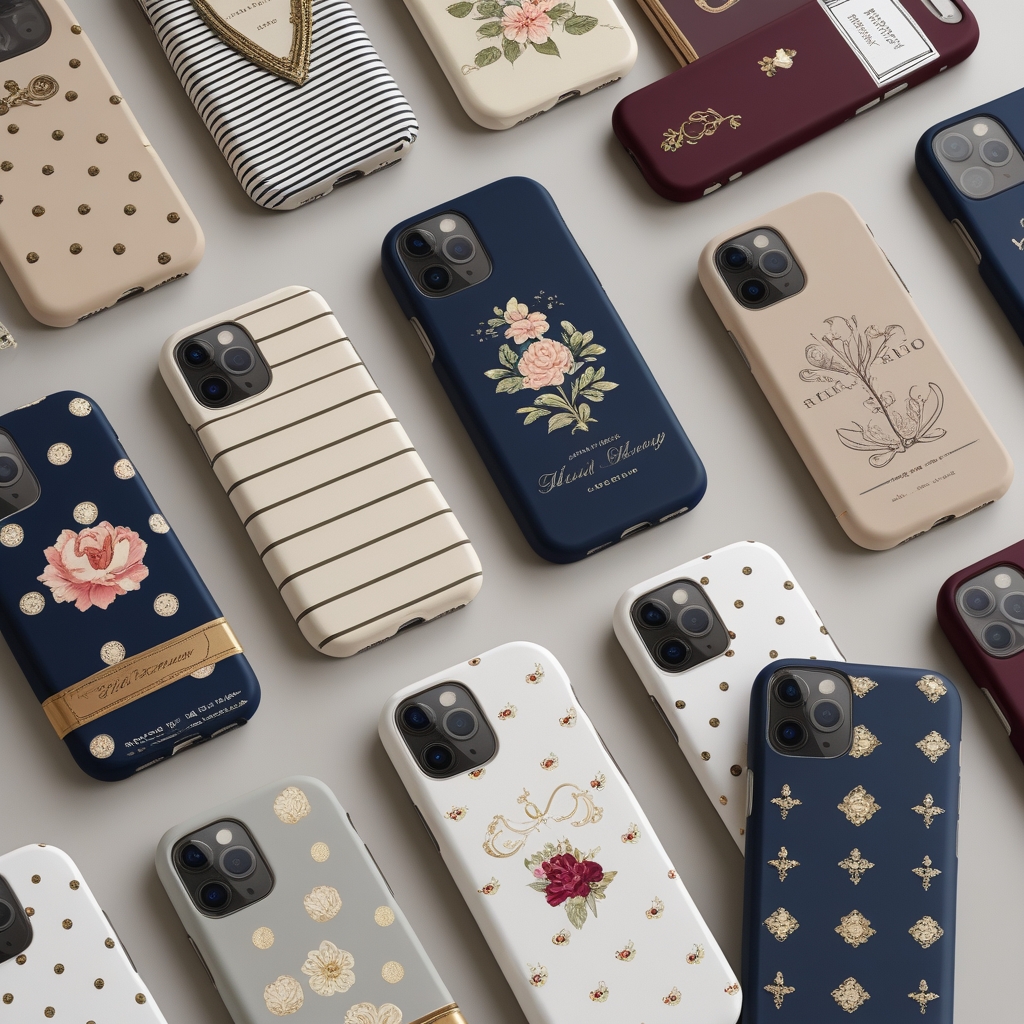
Explore examples of successful designs to spark your creativity. Each design showcases different techniques and styles that work well for custom phone cases.
What Makes Great Designs
Successful phone case designs balance visual appeal with practical considerations. The best designs consider how elements will look when wrapped around a device, accounting for curves, edges, and functional cutouts.
Recommended Design Tools
While you can use any design software, these tools are particularly well-suited for creating phone case designs.
Adobe Illustrator
Perfect for vector-based designs. Create scalable graphics that maintain quality at any size. Ideal for logos, patterns, and geometric designs.
Adobe Photoshop
Excellent for photo manipulation and complex raster designs. Great for combining multiple images and applying effects.
Canva
User-friendly option for beginners. Offers templates and easy-to-use tools for creating professional-looking designs without extensive design experience.
Figma
Web-based design tool perfect for collaboration. Great for creating mockups and testing how designs will look on devices.
Ready to Create Your Design?
Whether you have a complete design ready or need guidance bringing your ideas to life, our team is here to help. Contact us to discuss your vision and receive personalized recommendations for your custom phone case.